Smart previews
Colours and code, shown as they are
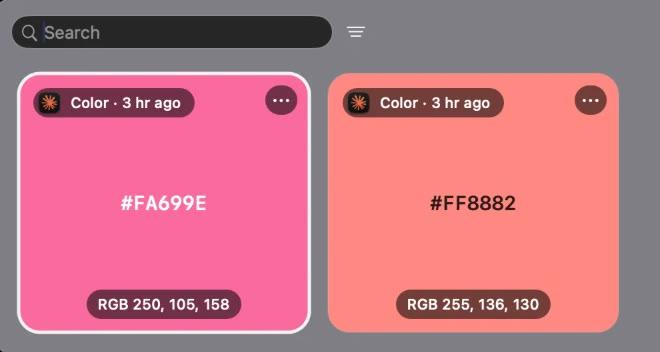
A colour copied as text becomes a swatch you can see, and copied code shows in colour with its language named.
Built into Ledge for macOS.
Swatches
#6E7BF2 or rgb(110, 123, 242) fills its card with that colour, with its RGB values underneath.
Code in colour
Copied code shows in a fixed-width font with Xcode's colours, and its card names the language.
Yours to turn off
Each preview has its own switch, and colours without a # can count too.
More in Ledge
Every feature- Smart pinboardsTabs beside Clipboard that gather every colour, link, image, file, piece of code or email address on their own.
- Floating shelfA shelf that comes to the pointer instead, and tucks itself away a few seconds after you leave it.
- TransformDrop files on Transform, pick a tool and press the button: compress, convert and edit, all on this Mac, never uploaded.
- Lock screenThe song in Liquid Glass under the clock. Click its cover and the artwork fills the whole screen, with the controls, volume and lyrics a click away.