
AI · An add-on for Ledge
Agents
Claude Code, Codex and Cursor in the notch
Version 0.3.0 · By Sumit
See Agents in Ledge
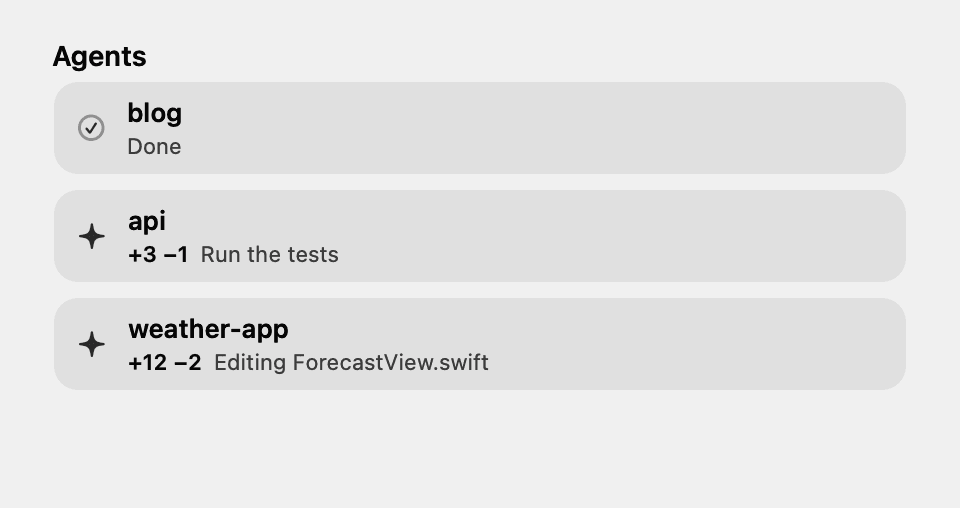
What Agents does
Agents shows what your Claude Code and Codex sessions are doing; Codex needs nothing connected. While one works or waits for you, opening the notch shows it in Home's place, and closed, it takes the notch from the song playing. Beside the notch you see the latest session's step, like editing a file or running a build, and a tick when it finishes. Usage shows a ring for each agent with how much of your plan's limit is left and when it resets. On the add-on's page in the notch you see every session with its step and the lines its edits added and removed. A Home widget lists your latest sessions, and shows on your iPhone too. When Claude Code wants permission for a tool, the notch asks and you allow or deny it there; with no answer, Claude Code asks as usual. Connect it in the add-on's settings, which adds Ledge's hooks to Claude Code's settings file and keeps a copy of the file as it was. Nothing leaves your Mac. Not made by Anthropic. The screenshot shows sample sessions.
- Version
- 0.3.0
- Category
- AI
- Developer
- Sumit
- Availability
- Free · needs a Ledge with LedgeKit 0.27 and Claude Code · macOS 14 or later
Install Agents
- Download Ledge and open it on your Mac.
- Open Settings → Add-on Store and search for Agents.
- Choose Install, then review and approve the permissions it requests.


