
System · An add-on for Ledge
Cleaner
Uninstall apps, leftovers and all
Version 0.1.0 · By Ledge
See Cleaner in Ledge
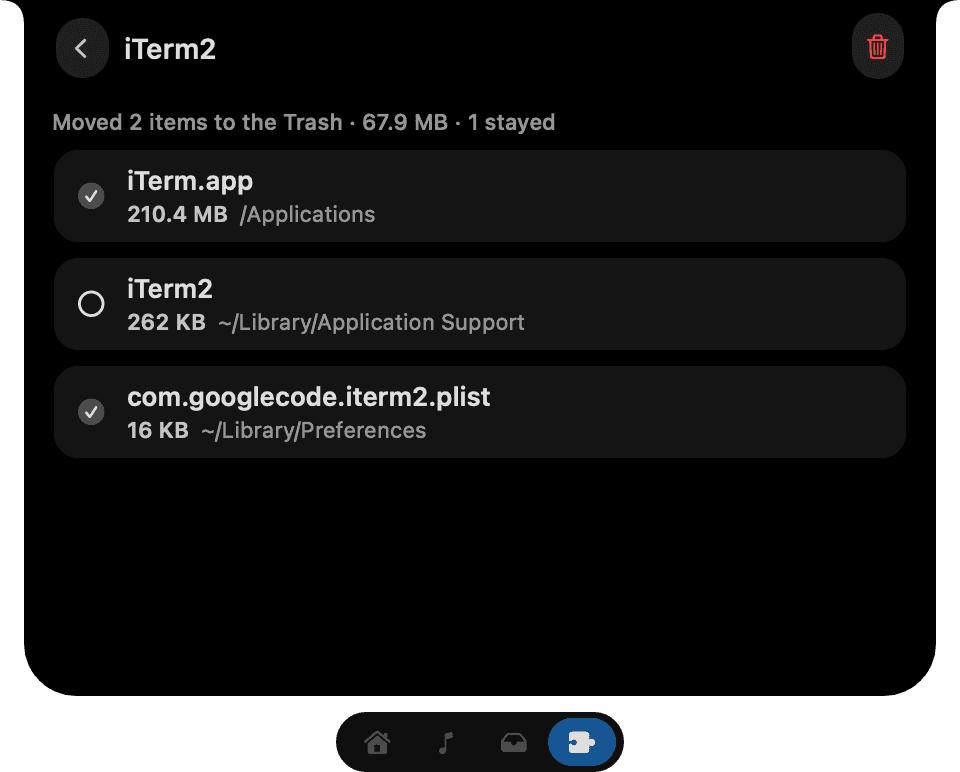
What Cleaner does
Cleaner has its own page in the notch's Add-ons tab. Uninstall an app: choose it from your apps, drop it on Uninstall, or choose Send with Cleaner, Uninstall… on a shelf item. Cleaner lists the app with every file it left in your Library, each with its size and place. Files named after the app's identifier start checked, ones that only share its name start unchecked, and nothing moves until you press Move to Trash. If the app is open, Cleaner asks it to quit first. Clean up storage sizes app caches, logs, Xcode build data, device support files and developer caches, and you choose what goes. Everything goes to the Trash, and Put Back returns it until you empty it. Scheduled cleaning, weekly or monthly, moves caches and logs nobody used in three days, leaving open apps' alone. Cleaner never offers macOS's own apps, Ledge, Apple's caches, or anything outside your Library and developer cache folders. Other apps' sandboxes are found by name and never opened.
- Version
- 0.1.0
- Category
- System
- Developer
- Ledge
- Availability
- Free · needs a Ledge with LedgeKit 0.20 or later
Install Cleaner
- Download Ledge and open it on your Mac.
- Open Settings → Add-on Store and search for Cleaner.
- Choose Install, then review and approve the permissions it requests.


