
Productivity · An add-on for Ledge
Launcher
Open apps, settings and files, and get quick answers, from one search
Version 0.2.0 · By Ledge
See Launcher in Ledge
What Launcher does
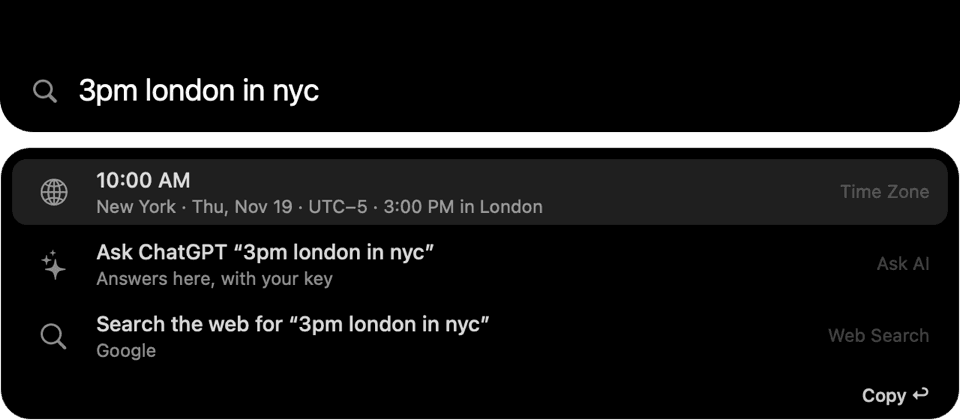
Launcher gives Ledge a search bar for everything: press its shortcut (⌥Space unless you change it on its page in Settings) and start typing. Open apps, pages of System Settings such as Wi‑Fi or Displays, and files and folders in your home folder. Answers show as you type: sums like 1,250 × 1.2 or 80 + 15%, tips like 18% tip on 62.50, conversions like 10 km in miles or 212 f to c, and times like time in tokyo or 3pm london in nyc. Return opens the top row or copies the answer. Everything is found on this Mac, files through Spotlight's index. Ask AI answers questions right in the launcher with your own API key for Claude, ChatGPT, Gemini or any OpenAI-compatible server (OpenRouter, Groq, a local Ollama): add it on the Launcher's page in Settings. The key stays in your Mac's Keychain and goes only to the service you choose, and a question is sent only when you choose its Ask row.
- Version
- 0.2.0
- Category
- Productivity
- Developer
- Ledge
- Availability
- Free · needs a Ledge with the launcher (0.1.0 Beta 7 or later; categories need Beta 8)
Install Launcher
- Download Ledge and open it on your Mac.
- Open Settings → Add-on Store and search for Launcher.
- Choose Install, then review and approve the permissions it requests.


